Terraforming
TASC adds a comprehensive terraforming system that allows you to reshape worlds through long-running projects. Using the terraforming menu, you can change a planet's type, improve its natural resources, or modify its atmospheric and climate conditions.
Terraforming Menu
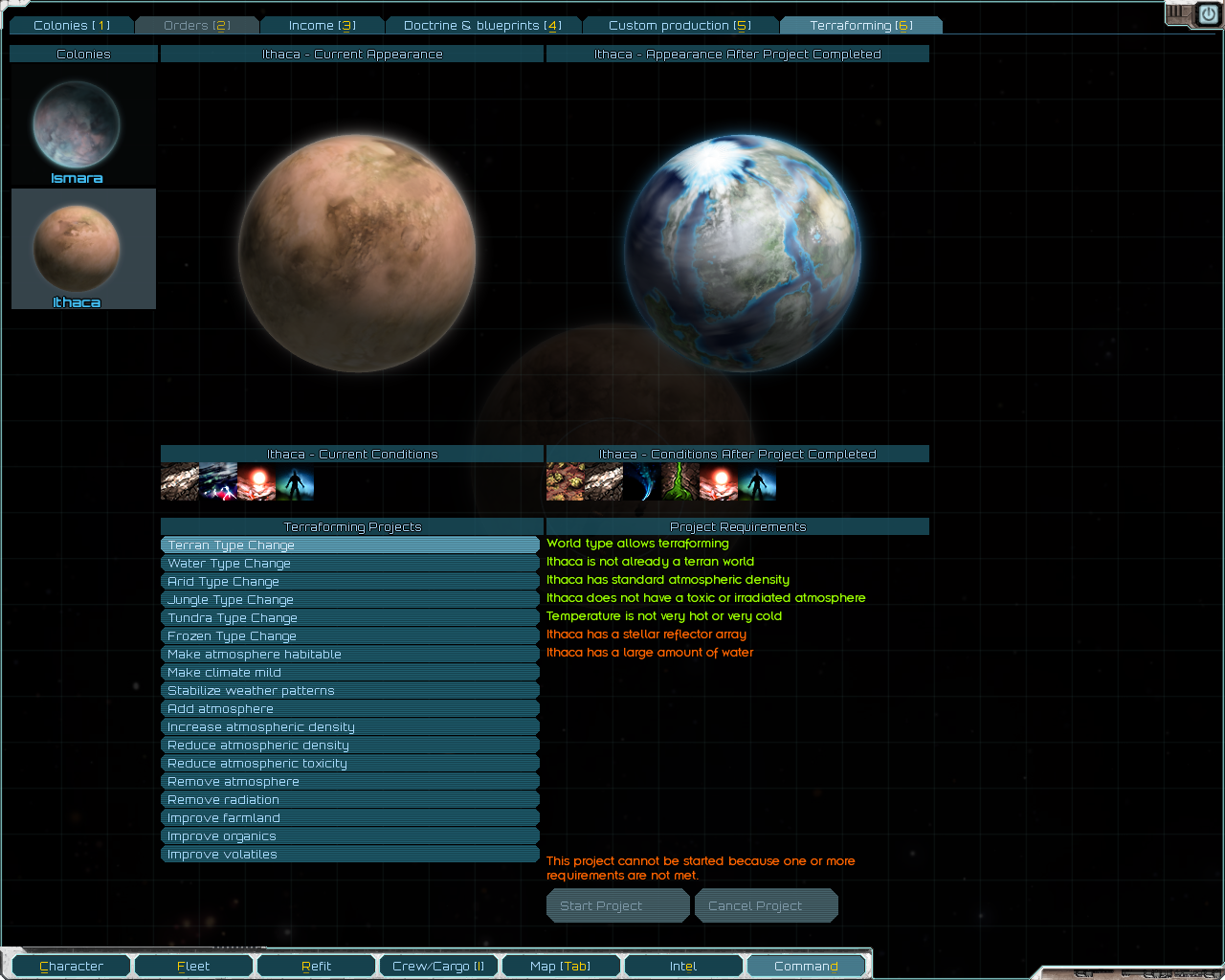
The terraforming menu is integrated into the command UI (opened via the "D" key). The left panel displays all of your colonized planets, showing their current appearance and conditions. Selecting a planet reveals the available terraforming projects. Clicking a project shows a preview of the planet's appearance and conditions after the project completes, along with a list of requirements color-coded to indicate whether they are met.
Only one terraforming project can be active per colony at a time. Starting a new project on a colony that already has one in progress will cancel the existing project.
Project Types
There are three categories of terraforming projects, each with a configurable default duration:
- Planet type change — transforms the planet into a different type entirely. Takes 400 days. (configurable via LunaLib settings)
- Resource improvement — increases the level of a natural resource (farmland, organics, or volatiles) by one tier. Takes 200 days. (configurable via LunaLib settings)
- Condition modification — adds or removes a market condition such as atmosphere type, habitability, or climate. Takes 200 days. (configurable via LunaLib settings)
Project Lifecycle
Terraforming projects progress one day per in-game day, but only while all requirements remain satisfied. If any requirement becomes unmet during a project (for example, a required building is disrupted), the project stalls and progress pauses until the requirement is met again. When the requirement is restored, the project resumes from where it left off. Notifications are sent when a project stalls or resumes.
Planet Type Categories
TASC classifies planets into one of ten types. These types determine which terraforming projects are available, what resources can be improved, and what the base resource levels are after a type change. Vanilla and modded planet type IDs are mapped to these TASC types via a configuration file.
| TASC Type | Terraformable | Farmland Support | Base Water | Organics (Base / Max) | Volatiles (Base / Max) |
|---|---|---|---|---|---|
| Barren | Yes | No | Low | — / — | — / — |
| Desert | Yes | Yes | Medium | Trace (-1) / Common (0) | — / Trace (-1) |
| Frozen | Yes | No | High | — / — | Diffuse (0) / Plentiful (+2) |
| Gas Giant | No | No | Low | — / — | — / — |
| Jungle | Yes | Yes | High | Common (0) / Plentiful (+2) | — / — |
| Terran | Yes | Yes | High | Common (0) / Plentiful (+2) | Trace* (-1) / Plentiful (+2) |
| Toxic | Yes | No | Low | — / — | — / — |
| Tundra | Yes | Yes | Medium | — / Trace (-1) | Diffuse* (0) / Plentiful (+2) |
| Volcanic | No | No | Low | — / — | — / — |
| Water | Yes | No | High | Common (0) / Plentiful (+2) | — / Abundant (+1) |
* Volatiles deposits block installation of Soil Nanites. There is a LunaLib setting to prevent Terran and tundra planets from receiving volatiles by default.
Water Level
Each planet has a water level of low, medium, or high, determined by its TASC planet type (see table above). Many terraforming projects — particularly planet type changes and farmland improvements — require a minimum water level.
The water level is raised to high if an operational Ismara's Sling or Asteroid Processing facility exists on any colony you own in the same star system. This is often necessary for terraforming barren, desert, toxic, or tundra worlds that have low or medium base water.
Temperature
Planets may have temperature conditions such as hot, cold, very hot, or very cold. Temperature cannot be permanently changed by terraforming. However, the Stellar Reflector Array building can suppress hot, cold, and poor light conditions while it is operational. Different planet type changes require different temperature ranges — for example, a terran type change requires the planet not be very hot or very cold, while a frozen type change requires the planet to be very cold.
All Terraforming Projects
Planet Type Changes
Unknown Skies Planet Type Changes
Resource Improvements
Condition Modifications
- Add Atmosphere
- Increase Atmospheric Density
- Reduce Atmospheric Density
- Reduce Atmospheric Toxicity
- Remove Atmosphere (can be enabled via LunaLib settings)
- Make Atmosphere Habitable
- Make Climate Mild
- Stabilize Weather Patterns
- Remove Radiation (can be enabled via LunaLib settings)
Notes:
- Stars, gas giants, and volcanic worlds cannot be terraformed.
- If the Ashes of the Domain: Vaults of Knowledge mod is enabled, terraforming projects require research before they can be started.